This article was machine-translated from the Japanese version.
Environment
- Mattermost 5.11.0
- Zabbix 4.2.4
Procedure
1. Create Incoming Webhook
Select Integrations > Incoming Webhook > Add Incoming Webhook from the Mattermost menu.
Choose the channel you want to notify; other settings are optional.
Note the URL generated after configuration.
2. Place the notification script on the Zabbix server
Here we use https://github.com/jirouette/zabbix-mattermost-alertscript
Place the script mattermost.py under the path specified by AlertScriptsPath= in /etc/zabbix/zabbix_server.conf.
Modify part of the content as follows:
- URL
- The URL generated in step 1
- ICON
- The URL of the icon to display in notifications
Also, change the permissions with the following command:
sudo chown root:root mattermost.py
sudo chmod 755 mattermost.py
After changing, verify that a notification is sent to Mattermost with the following command.#alerts specifies the channel to notify.
python mattermost.py '#alerts' PROBLEM 'Oh no! Something is wrong!'
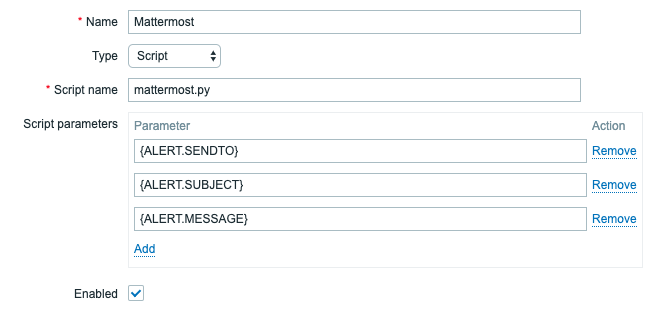
3. Create Media Type
Select Administration > Media types > Create media type from the Zabbix console and enter the following.
4. Create User
Select a new or existing user from Administration > Users and add the following content to Media.
However, specify the channel configured in step 1 in Send to.
Hereafter, the user with Media configured is referred to as Admin.

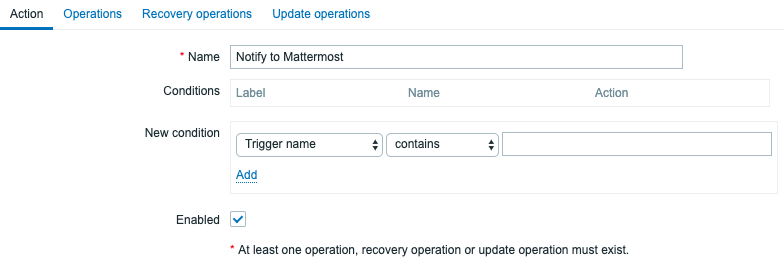
5. Add Action
Add the following content from Configuration > Actions > Create action.
Action
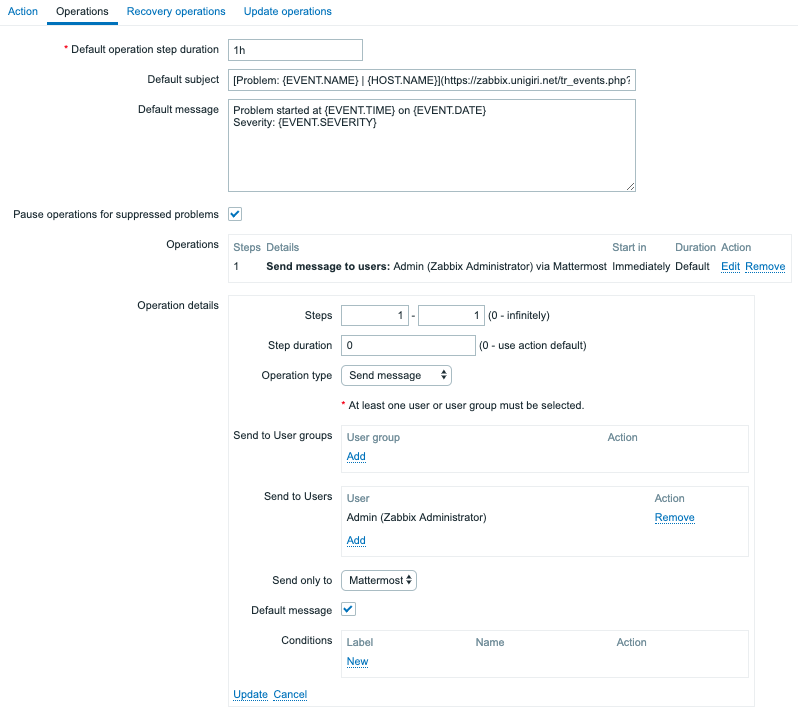
Operations
By specifying [Problem: {EVENT.NAME} | {HOST.NAME}](https://SERVER_NAME/tr_events.php?triggerid={TRIGGER.ID}&eventid={EVENT.ID}) as the Default subject, you can add a link to the alert details.
6. Verify Behavior
Add a Trigger that will reliably generate an alert, or increase load by running something like yes > /dev/null to trigger an alert.
If the alert is displayed in Monitoring > Problems and a number appears in the Actions column, the Zabbix configuration is successful.
Confirm that a notification is sent to Mattermost.
Supplementary: Macros available for error message configuration
Macros such as {EVENT.NAME} and {HOST.NAME} exist to change content based on alerts.
For a list of macros, refer to the following:
https://www.zabbix.com/documentation/4.2/manual/appendix/macros/supported_by_location